I was lucky enough to win a Nokia N800 at LugRadio Live 2007, because I’d come from South Africa. I’ve had it for 3 months now, and the successor was announced last week, so I think it’s time to blog about it, properly.
Hardware
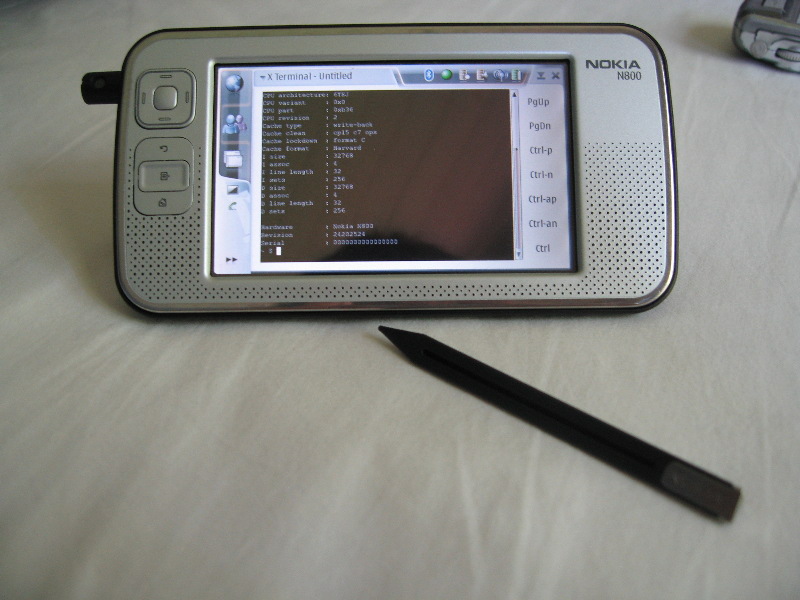
The hardware is pretty decent. The screen is very bright and vivid (great for photos), and just big enough to read websites comfortably. There are enough buttons to fulfil the basic tasks without reaching for the stylus, but you generally work it with the stylus (or a finger). It has quite a few hardware features:
- A periscope webcam (640x480) that pops out the left side, and can swivel 200°
- 2 SD sockets (one in battery compartment, for more permanent storage, and one external)
- It ships with a 128MiB µSD card and SD adaptor. I wish manufacturers would ship with decent sized (say 2GiB) cards…
- A built-in FM radio (requires headphone lead for antenna)
- WiFi (802.11g)
- Bluetooth
- Stereo Speakers (very tinny)
- Microphone
- Headset socket (ships with a wired stereo hands-free set)
- Standard Nokia charger (I wish it charged by USB)
- mini-USB-B port. It has the hardware to be used in USB OTG mode, but this requires a custom kernel and custom cables
- A (slightly flimsy) fold-out standing-arm
- A spare stylus
The battery life is comperable to my cellphone (about a week of non-use, or a day or two of use), and I’m happy with most of the hardware, but I do have a few issues:
The power button isn’t sufficiently recessed for it’s soft carrying case. This means that I can’t carry it off in my bag, it’ll turn itself on eventually, and run it’s battery flat from spurious touch-screen clicks. The solution is to always leave it on, and screen-locked (it supports an auto-lock). For a cellphone manufacturer, I’d have thought they’d get this right.
The webcam’s position at the far left means it gets a good view of the left side of your face. This can be a little disconcerting.
The USB port is (without some serious hackery) only in peripheral mode. I’d really like to be able to plug a USB keyboard into this device (bluetooth keyboards are way too expensive).
There’s a bottleneck in the system (processor presumably), that stops it playing youtube videos at full framerate. Mplayer seems to just be able to handle QVGA video at 24fps, but nothing more.
Processor : Some Random V6 Processor rev 2 (v6l)
BogoMIPS : 320.37
Features : swp half thumb fastmult vfp edsp java
CPU implementer : 0x41
CPU architecture: 6TEJ
CPU variant : 0x0
CPU part : 0xb36
CPU revision : 2
Cache type : write-back
Cache clean : cp15 c7 ops
Cache lockdown : format C
Cache format : Harvard
I size : 32768
I assoc : 4
I line length : 32
I sets : 256
D size : 32768
D assoc : 4
D line length : 32
D sets : 256
Hardware : Nokia N800
Revision : 24202524
Serial : 0000000000000000
Software
The software stack of the N800 is everything I could desire. It runs a Debian derivative of Linux, Maemo. Maemo uses proper Debian package management, the GTK widget set (with addons), Telepathy for IM, and Gstreamer for media. This makes it a doddle to port existing X applications to the N800.
When you first turn on the N800, after unboxing (or reflashing), you go through an install wizard. It sets the hostname, timezone, and pairs with your bluetooth cellphone. The bluetooth phone pairing is well thought out, and beats anything I’ve ever come across on any platform. Unfortunately it suffers from the same problem as Windows - it doesn’t set your Home Town, etc. based on the time-zone.
The default web browser is Opera-based, but a Gecko engine is available, and a WebKit one remoured to be on the way. It has a (proprietary) flash plugin, so you can watch YouTube, and the CACert.org root certificate is pre-installed :-)
The device has 4 input modes:
- Bluetooth keyboard (or something like Russ Nelson’s chording bluetooth keyboard, which I came across at OSCON, and is truly a sight to behold)
- Stylus on-screen keyboard. I find this frustrating, but at least it has predictive-text.
- Full screen, thumb on-screen keyboard. This is better, but switching between pages (case, numerals, symbols) gets tiring. It’s launched by pressing on a text field with a finger, this only works about 60% of the time.
- A user has prototyped an iPhone-like keyboard for the N800 (in python), which works very nicely. But clearly the Maemo input system doesn’t allow plugins, so it remains a prototype.
- Handwriting recognition. I’m a P910i user, so this fits well with me, but I took a while to get used to writing inside the input area, rather than all over the screen. The handwriting recognition is good, and trainable, which is very nice. But I find the input area too small to reliably input in the correct case. It can’t decipher cursive (but then nobody can decipher my cursive), and some symbols don’t input easily. All this is forgiven by the ability to correct the handwriting recognition, by writing over the incorrect letter.
I find the input fine, although slow, for everything except passwords. Multi-case, symbol-laden passwords really bring out the worst of all the input systems.
The default software selection is passable, but not great. The device really ships with “internet tablet” software, with a few decent games thrown in. The major problems are the media player doesn’t play oggs or video, and the e-Mail program’s IMAP support, which is a joke, at best (It uses IMAP as if it was POP).
But I enabled a few extra repositories and soon my N800 became a really cool device:
- Camera (by default, the web-cam is only used by the “Internet Call” software)
- There is a port of Claws, which is a real IMAP client
- Fmradio (yes it isn’t usable by default)
- ipython (the maemo Hildon GUI library has python bindings)
- maemo-mapper. It’s hard to tell the functionality of this without a GPS, but it supports all the popular online maps (for imagery), and uses OpenStreetmap by default, which turns many geeks’ eyes.
- maemo-recorder - A sound recorder.
- maemo-wordpy - A WordPress client.
- Mediastreamer - A UPNP media client. I’ve tried this with MediaTomb and GMediaServer, but in both cases, connections seemed to die prematurely. I think this is a known bug with libupnp.
- Mplayer - I used my N800 to watch movies on cheap transatlantic flights. It’s battery life is much better than a laptop, although the screen is small.
- OpenSSH (client and server) - naturally :-)
- rdesktop and vncviewer - These impress geeks, while also being useful
- An X terminal is a must. The maemo-hackers edition is the one to get, it has a Ctrl-key…
- Skype is installable with one click. The N800 makes a great skype phone (assuming you have WiFi, which is rare to find in this country, but in Portland OR it was the perfect device to have in my back pocket)
My repositories:
http://catalogue.tableteer.nokia.com/certified/ bora user

http://catalogue.tableteer.nokia.com/non-certified/ bora user

http://repository.maemo.org/ bora free non-free

http://repository.maemo.org/extras/ bora free non-free

http://www.claws-mail.org/maemo/ bora user

http://maemo-hackers.org/apt bora main
What’s the point
It’s a cool device for a geek to own, no doubt, but what’s the actual point of it?
I can answer that in a few ways:
- Firstly, it’s screen’s bigger than my cellphone, but smaller than a laptop, so it’s good for goofing off during university lectures, and surfing the web.
- It plays YouTube. All my machines are AMD64, and don’t run proprietary flash, so they don’t. I can’t say I use this much, but when I’m forced at gunpoint to watch a YouTube video, I can do it.
- It’s nice for looking at photos. Bigger than a camera / phone, and supporting bluetooth and SD.
- I don’t own a portable video player, so this is my portable video player.
- When you can’t get to sleep at night, and suddenly something comes to you that you meant to find out about on Wikipedia or the web, you can grab it from the bedside table and do so. (Yes, I’m an unashamed geek)
- My cellphone is notoriously unreliable, and this doesn’t make for a good alarm clock. So the N800 got pressed into this service. However, it’s alarm system seems to have a bad bug, that can semi-brick it for a week. I haven’t got to the bottom of it. But sometimes (and only when you have alarms set), it won’t boot for a week. You either have to re-flash it, or wait for it to suddenly wake up and make alarm noises.
- If I want to see if there’s WiFi somewhere, it’s a lot quicker to check on the N800, then to take out a laptop.
But in the end, all that matters is that it runs Linux , and has Python dammit, so it’s a piece of cake to write any software for it that I want to. I think that reason on it’s own makes it a device worth owning.
I was lucky enough to win a Nokia N800 at LugRadio Live 2007, because I’d come from South Africa. I’ve had it for 3 months now, and the successor was announced last week, so I think it’s time to blog about it, properly.
Hardware
The hardware is pretty decent. The screen is very bright and vivid (great for photos), and just big enough to read websites comfortably. There are enough buttons to fulfil the basic tasks without reaching for the stylus, but you generally work it with the stylus (or a finger). It has quite a few hardware features:
- A periscope webcam (640x480) that pops out the left side, and can swivel 200°
- 2 SD sockets (one in battery compartment, for more permanent storage, and one external)
- It ships with a 128MiB µSD card and SD adaptor. I wish manufacturers would ship with decent sized (say 2GiB) cards…
- A built-in FM radio (requires headphone lead for antenna)
- WiFi (802.11g)
- Bluetooth
- Stereo Speakers (very tinny)
- Microphone
- Headset socket (ships with a wired stereo hands-free set)
- Standard Nokia charger (I wish it charged by USB)
- mini-USB-B port. It has the hardware to be used in USB OTG mode, but this requires a custom kernel and custom cables
- A (slightly flimsy) fold-out standing-arm
- A spare stylus
The battery life is comperable to my cellphone (about a week of non-use, or a day or two of use), and I’m happy with most of the hardware, but I do have a few issues:
The power button isn’t sufficiently recessed for it’s soft carrying case. This means that I can’t carry it off in my bag, it’ll turn itself on eventually, and run it’s battery flat from spurious touch-screen clicks. The solution is to always leave it on, and screen-locked (it supports an auto-lock). For a cellphone manufacturer, I’d have thought they’d get this right.
The webcam’s position at the far left means it gets a good view of the left side of your face. This can be a little disconcerting.
The USB port is (without some serious hackery) only in peripheral mode. I’d really like to be able to plug a USB keyboard into this device (bluetooth keyboards are way too expensive).
There’s a bottleneck in the system (processor presumably), that stops it playing youtube videos at full framerate. Mplayer seems to just be able to handle QVGA video at 24fps, but nothing more.
Processor : Some Random V6 Processor rev 2 (v6l)
BogoMIPS : 320.37
Features : swp half thumb fastmult vfp edsp java
CPU implementer : 0x41
CPU architecture: 6TEJ
CPU variant : 0x0
CPU part : 0xb36
CPU revision : 2
Cache type : write-back
Cache clean : cp15 c7 ops
Cache lockdown : format C
Cache format : Harvard
I size : 32768
I assoc : 4
I line length : 32
I sets : 256
D size : 32768
D assoc : 4
D line length : 32
D sets : 256
Hardware : Nokia N800
Revision : 24202524
Serial : 0000000000000000
Software
The software stack of the N800 is everything I could desire. It runs a Debian derivative of Linux, Maemo. Maemo uses proper Debian package management, the GTK widget set (with addons), Telepathy for IM, and Gstreamer for media. This makes it a doddle to port existing X applications to the N800.
When you first turn on the N800, after unboxing (or reflashing), you go through an install wizard. It sets the hostname, timezone, and pairs with your bluetooth cellphone. The bluetooth phone pairing is well thought out, and beats anything I’ve ever come across on any platform. Unfortunately it suffers from the same problem as Windows - it doesn’t set your Home Town, etc. based on the time-zone.
The default web browser is Opera-based, but a Gecko engine is available, and a WebKit one remoured to be on the way. It has a (proprietary) flash plugin, so you can watch YouTube, and the CACert.org root certificate is pre-installed :-)
The device has 4 input modes:
- Bluetooth keyboard (or something like Russ Nelson’s chording bluetooth keyboard, which I came across at OSCON, and is truly a sight to behold)
- Stylus on-screen keyboard. I find this frustrating, but at least it has predictive-text.
- Full screen, thumb on-screen keyboard. This is better, but switching between pages (case, numerals, symbols) gets tiring. It’s launched by pressing on a text field with a finger, this only works about 60% of the time.
- A user has prototyped an iPhone-like keyboard for the N800 (in python), which works very nicely. But clearly the Maemo input system doesn’t allow plugins, so it remains a prototype.
- Handwriting recognition. I’m a P910i user, so this fits well with me, but I took a while to get used to writing inside the input area, rather than all over the screen. The handwriting recognition is good, and trainable, which is very nice. But I find the input area too small to reliably input in the correct case. It can’t decipher cursive (but then nobody can decipher my cursive), and some symbols don’t input easily. All this is forgiven by the ability to correct the handwriting recognition, by writing over the incorrect letter.
I find the input fine, although slow, for everything except passwords. Multi-case, symbol-laden passwords really bring out the worst of all the input systems.
The default software selection is passable, but not great. The device really ships with “internet tablet” software, with a few decent games thrown in. The major problems are the media player doesn’t play oggs or video, and the e-Mail program’s IMAP support, which is a joke, at best (It uses IMAP as if it was POP).
But I enabled a few extra repositories and soon my N800 became a really cool device:
- Camera (by default, the web-cam is only used by the “Internet Call” software)
- There is a port of Claws, which is a real IMAP client
- Fmradio (yes it isn’t usable by default)
- ipython (the maemo Hildon GUI library has python bindings)
- maemo-mapper. It’s hard to tell the functionality of this without a GPS, but it supports all the popular online maps (for imagery), and uses OpenStreetmap by default, which turns many geeks’ eyes.
- maemo-recorder - A sound recorder.
- maemo-wordpy - A WordPress client.
- Mediastreamer - A UPNP media client. I’ve tried this with MediaTomb and GMediaServer, but in both cases, connections seemed to die prematurely. I think this is a known bug with libupnp.
- Mplayer - I used my N800 to watch movies on cheap transatlantic flights. It’s battery life is much better than a laptop, although the screen is small.
- OpenSSH (client and server) - naturally :-)
- rdesktop and vncviewer - These impress geeks, while also being useful
- An X terminal is a must. The maemo-hackers edition is the one to get, it has a Ctrl-key…
- Skype is installable with one click. The N800 makes a great skype phone (assuming you have WiFi, which is rare to find in this country, but in Portland OR it was the perfect device to have in my back pocket)
My repositories:
http://catalogue.tableteer.nokia.com/certified/ bora user
http://catalogue.tableteer.nokia.com/non-certified/ bora user
http://repository.maemo.org/ bora free non-free
http://repository.maemo.org/extras/ bora free non-free
http://www.claws-mail.org/maemo/ bora user
http://maemo-hackers.org/apt bora main
What’s the point
It’s a cool device for a geek to own, no doubt, but what’s the actual point of it?
I can answer that in a few ways:
- Firstly, it’s screen’s bigger than my cellphone, but smaller than a laptop, so it’s good for goofing off during university lectures, and surfing the web.
- It plays YouTube. All my machines are AMD64, and don’t run proprietary flash, so they don’t. I can’t say I use this much, but when I’m forced at gunpoint to watch a YouTube video, I can do it.
- It’s nice for looking at photos. Bigger than a camera / phone, and supporting bluetooth and SD.
- I don’t own a portable video player, so this is my portable video player.
- When you can’t get to sleep at night, and suddenly something comes to you that you meant to find out about on Wikipedia or the web, you can grab it from the bedside table and do so. (Yes, I’m an unashamed geek)
- My cellphone is notoriously unreliable, and this doesn’t make for a good alarm clock. So the N800 got pressed into this service. However, it’s alarm system seems to have a bad bug, that can semi-brick it for a week. I haven’t got to the bottom of it. But sometimes (and only when you have alarms set), it won’t boot for a week. You either have to re-flash it, or wait for it to suddenly wake up and make alarm noises.
- If I want to see if there’s WiFi somewhere, it’s a lot quicker to check on the N800, then to take out a laptop.
But in the end, all that matters is that it runs Linux , and has Python dammit, so it’s a piece of cake to write any software for it that I want to. I think that reason on it’s own makes it a device worth owning.